Time tracking for macOS
Writing is easy.
Timing isn't.
Strimu is a minimalist notepad that doubles as a time tracker. Start a line and the clock runs. Hit enter and it stops. Freelancers, consultants and developers get a clean freelancer timesheet out of the notes they were already taking.
 Try it free for 14 days • No account
required
Try it free for 14 days • No account
required
Built for flow state. Not corporate surveillance.
If you’re not into surveillance, or creepy monitoring that summarizes your day for you, and you’d rather keep the simplicity of a spreadsheet or a text file, Strimu was built for you. You’re already taking notes while you work, so they might as well keep time. The day adds up on its own instead of getting rebuilt from memory at 6pm.
Frictionless Note-Taking
Type your task line naturally. Hit enter, and the previous task completes while its calculated duration locks in automatically.
Chronological Auto-Sort
Forgot an entry? Edit or add a timestamp inline. Strimu safely reorders your workspace into a clean chronological daily log.
Easy Invoicing & CSV Export
No proprietary formats or locked data. Export your logs as a straightforward CSV for spreadsheets or markdown.
Sweeping Timeline Fixes
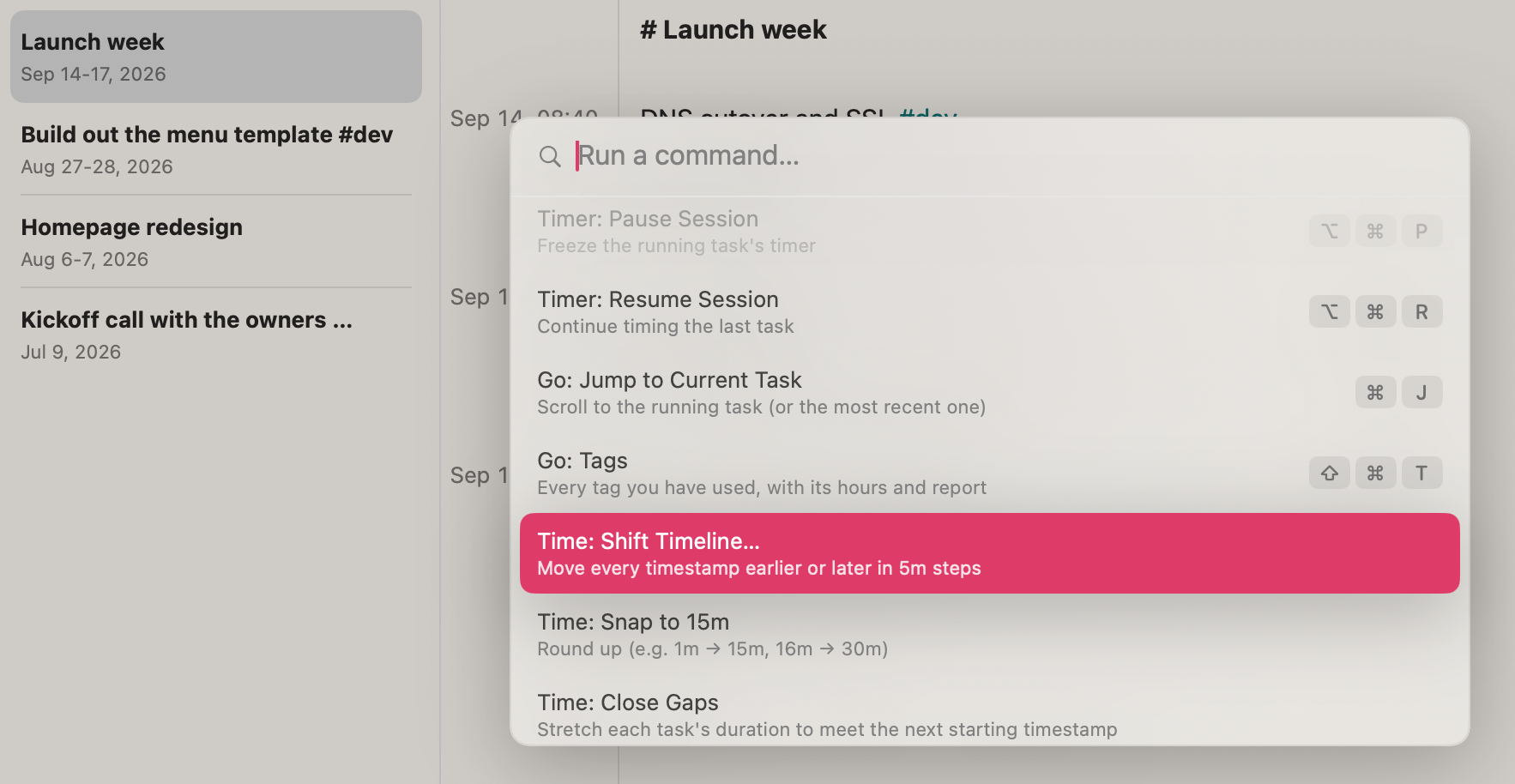
Press ⌘K, pick a command, and it reshapes the entire day at once: closing gaps, untangling overlaps, rounding rough durations. No nudging entries one at a time.
Tags That Add Up
Type #design as you work. Every entry carrying it totals across every client, priced at your rate and burned down against the hours you quoted.
Just Enough Formatting
A deliberately small markdown subset: headings, bold, italic, and #tags. Nothing else. Strimu never rewrites what you typed, so your entries export exactly as they appear.
Fix mistakes instantly.
Traditional timesheet software makes editing your history a tedious chore hidden behind clunky dashboards and multi-step menus. Strimu treats your work log like a fluid text document.
If you need to tweak an entry, there is no complex interface to fight. You have total, independent control: click directly into any timestamp to change the time, or click right into the duration field to override it with your exact hours. It keeps your data simple, predictable, and entirely under your control.
Power at your fingertips.
It’s Friday at 5PM and you realize your entire timesheet is off by 15 minutes. Press ⌘K, pick Time: Shift Timeline, and the entire session slides back at once.
Repairing your timesheet with powerful tools is one keystroke away: shift the day, snap ragged durations to 15 minutes, close the gaps between tasks. No manual cleanup, no wasted Friday evening.
More than just #tags.
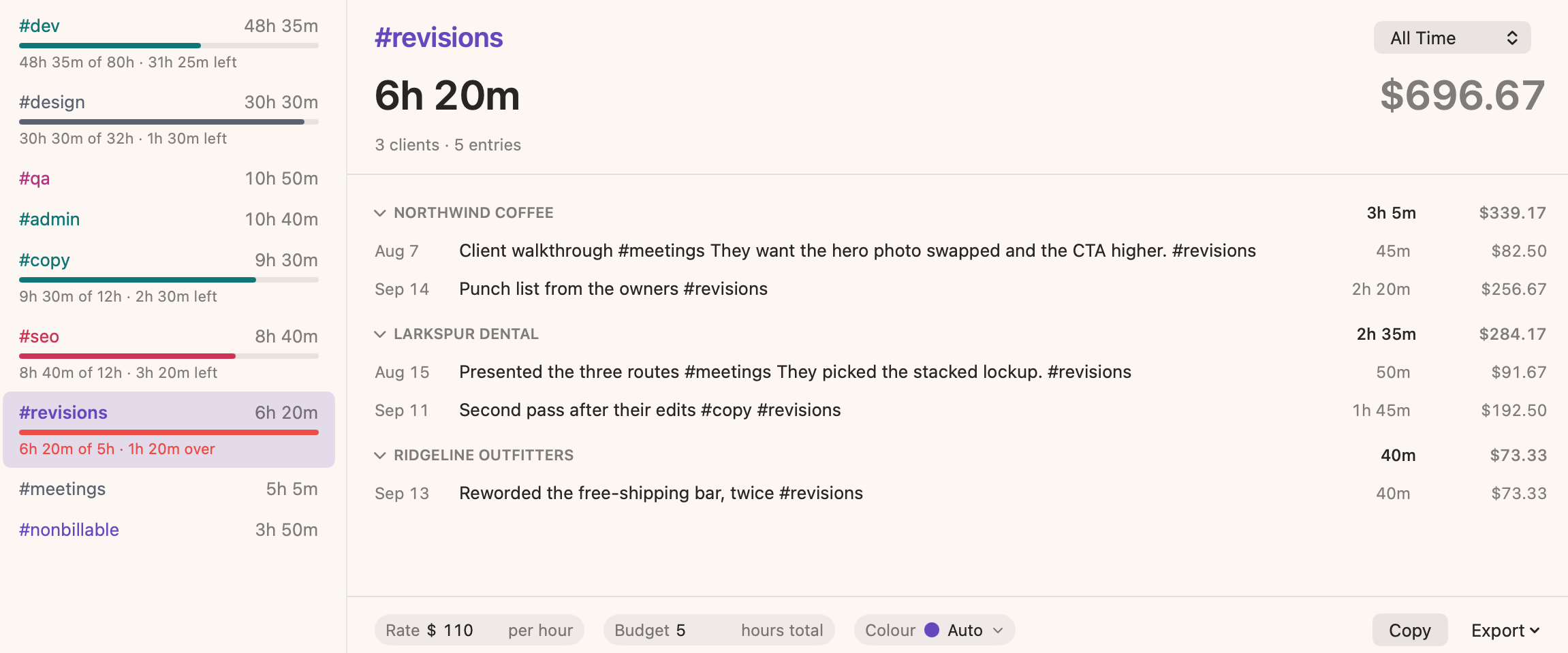
Type #revisions as you work and Strimu does the accounting. Six hours and twenty minutes across three clients, $696.67 billable, and a red bar saying you blew a five hour budget by 1h 20m.
That overage is $146.67 you either invoice or absorb. Give a tag a rate and a budget and you find out which one in week two, while you can still do something about it.
Frequently Asked Questions
Can I try Strimu before I buy it?
Absolutely. Strimu comes with a 14-day fully unlocked free trial. If you choose not to buy it after two weeks, your data stays perfectly safe: the app simply switches to a permanent read-only mode so you can still view and export your history.
Does Strimu require a recurring monthly subscription?
No. Strimu features a simple one-time purchase model for major versions. You own your application outright with zero ongoing subscriptions or locked-in cloud fees.
Will major versions get features and updates?
Yes! The plan is to keep adding features and updates to Strimu v1 until the next major release (v2).
How does the data export work?
Any session can instantly export directly into structured Markdown or a simple, standard CSV file containing Date, Time, Duration, and Entry rows. It’s clean, raw data ready to be dropped straight into Excel, Numbers, or your existing invoicing workflow.
Is this a secure local time tracking app?
Completely. Strimu is built exclusively for macOS, keeping your data stored securely within your Apple ecosystem. Your entries save instantly behind the scenes, and you are always in complete control of your data. There are no mandatory external accounts or corporate data trackers scraping your notes.
The easiest automatic time tracking app for your Mac.
Reclaim the hidden billable minutes lost to manual administrative tracking. Focus entirely on your actual work, and let plain text handle the timesheet math.
Compatible with macOS 14+